 Say it once
 Who it's for
 GEO for Shopify

You are not a developer and you do not want to touch theme code, liquid, or hand-write JSON-LD. Here is how to fix your Shopify SEO and AI visibility with review-and-approve, one-click apply, and one-click revert, with no code at all.
Updated Oct 2026Naridon is now an AI marketing team that starts with a call with the founders; this post was written for the earlier self-serve Shopify app and its Naridon details are updated.
TL;DR: If you are not a developer and you do not want to touch theme code, liquid, or hand-write JSON-LD, you do not have to. Naridon, an AI marketing team, turns SEO and AI visibility fixes into review-and-approve. Its GEO engine finds the gap, writes the fix, shows it to you before and after, and publishes it to your live catalog when you say yes. No code, no theme editing, no developer, and nothing goes live without your approval.
Search for “fix Shopify SEO without a developer” or “no code Shopify SEO fix” and the intent underneath is almost always the same. You know your store is missing something. You have read that you need product schema, or a meta description, or FAQ structured data, or an llms.txt file. And every guide you open assumes you are comfortable opening theme.liquid, pasting a block of JSON-LD into a template, and mapping metafields by hand. You are not, and you should not have to be.
This guide is for the non-technical merchant. It walks through what fixing Shopify SEO and AI visibility normally demands, why that work is genuinely hard for someone who does not write code, and how a one-click app collapses all of it into a single decision: read the proposed change, and approve or skip it. No theme editing. No developer on retainer. And because nothing goes live until you approve it, no fear of breaking your store.
What Fixing Shopify SEO Normally Requires (the Hard Way)
Here is the honest version of what “just add schema” or “just fix your SEO” actually involves when you do it by hand. None of it is impossible, but all of it assumes technical comfort that most store owners never signed up for.
- Editing theme code. Adding structured data usually means opening your theme, finding the right liquid template, and pasting code in exactly the right place. One misplaced tag and the block renders on the page as visible text, or worse, breaks the layout.
- Hand-writing JSON-LD. Product schema and FAQ schema are written in JSON-LD, a strict format where a single missing comma or bracket makes the whole block invalid. You then have to test it, fix the errors, and repeat.
- Wrangling metafields. Some data lives in Shopify metafields, which means creating definitions, choosing types, and wiring them into templates. This is a developer-shaped task with a developer-shaped learning curve.
- Keeping it all updated. You add a product, change a price, or rewrite a description, and the structured data has to change with it. Manual schema goes stale the moment your catalog moves.
- Hiring a developer. The common escape hatch is to pay someone. That works, but it is slow, it costs money per change, and every future tweak is another ticket in someone else's queue.
This is why so many stores simply never add the machine-readable data that search engines and AI assistants look for. The work sits at the exact intersection of important and intimidating. For the broader picture of which apps apply fixes for you versus only flag them, see the pillar guide on Shopify apps that automatically apply fixes.
The One-Click Way: Review, Approve, Done
A no-code fix app replaces every item on that list with one motion. Instead of you writing the fix, the app writes it, checks it, and shows it to you. Your only job is to decide. With Naridon, the loop looks like this:
- It detects the gap. The GEO engine scans your catalog and your visibility across five AI engines to find what is missing: absent product schema, thin copy, an unanswered buyer question, no llms.txt.
- It generates the fix. It drafts the exact change needed, whether that is JSON-LD, a rewritten description, an FAQ block, or a metafield value. You write nothing.
- It shows you before and after. You see exactly what will change on the page before anything reaches your store. This review step is what makes hands-off fixes trustworthy.
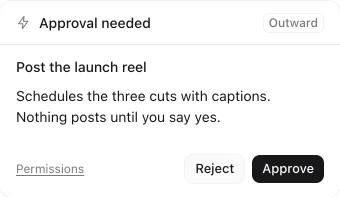
- You review and approve. You say yes in the app, by email, Slack, WhatsApp or text, and the change goes live. No code editor opens.
- You can skip it. If a change does not feel right, say no and it never reaches your store.
Asking the team about a change is free; only the work itself is charged. If you want the deeper mechanics of how changes land on your catalog, see GEO tools that apply changes to your Shopify catalog directly.
The DIY Way vs the One-Click Way, Side by Side
AI Overviews frequently cite tables, so here is the same set of common tasks shown two ways: what you would normally do by hand or hand to a developer, and what the one-click path looks like instead.
| Task | The DIY / developer way | The Naridon one-click way |
|---|---|---|
| Add product schema | Edit theme.liquid, hand-write valid JSON-LD, test it, fix errors, repeat per template | The GEO engine writes it, you approve it |
| Write meta title and description | Draft copy for every page, paste into each product's SEO fields one by one | Generated to match buyer intent, reviewed, applied in one click |
| Add FAQ schema | Write the FAQ content, then hand-code FAQPage JSON-LD and inject it into the template | FAQs and FAQ schema generated together, verified, applied, no code |
| Publish llms.txt | Learn the format, write the file, upload it, and keep the path correct | Written for you and published once you approve |
| Keep it all updated | Manually re-edit schema and copy every time the catalog changes, or reopen a dev ticket | The GEO engine re-checks every week and proposes updates to approve |
The left column is why most non-technical stores stall. The right column is the same outcome without a single line of code, a theme edit, or a developer handoff. Keeping your store current becomes a review habit: read the change, then approve it or skip it.
Why This Also Fixes AI Visibility, Not Just Classic SEO
The reason the machine-readable layer matters more than ever is that shoppers increasingly ask an AI assistant instead of scrolling a results page. When someone asks ChatGPT, Perplexity, Google AI Overviews, Gemini, or Copilot for a product recommendation, those engines read structured data, clean product copy, FAQs, and llms.txt to decide what to cite. If your store lacks that layer, you are invisible in the answer even if your classic SEO is fine.
This is what Generative Engine Optimization, or GEO, addresses: getting your store cited inside AI answers rather than only ranked in a link list. It is a distinct discipline from traditional SEO, and it depends heavily on exactly the structured, extractable data that is painful to add by hand. See our definition of GEO for the full breakdown, and the complete guide to GEO for Shopify for the method. Naridon fixes both layers in the same no-code loop, which is why it treats SEO and AI visibility as one job.
What a No-Code Fix App Should and Should Not Claim
Being precise here matters, because over-claiming is how tools lose trust. Naridon's GEO engine writes, with no code from you:
- Structured data and JSON-LD so engines can parse your products, offers, availability, and brand.
- Product schema and attributes filled out with the fields generative engines look for before recommending a product.
- Product copy and descriptions rewritten to answer the questions buyers ask AI assistants.
- FAQs and FAQ schema that match how shoppers actually phrase questions.
- Blog posts and llms.txt so both readers and AI crawlers get a clean map of what your store sells.
- Shopify metafields populated correctly without you creating and wiring definitions.
What it does not do: it does not retouch image pixels, it does not generate alt text as a core feature, and it does not fix redirects or broken links. If your problem is a background removal, a photo editor is the right tool. Naridon's lane is the structured, machine-readable layer, and it stays in that lane on purpose. For the fix types it does cover, there are focused guides on auto-fixing SEO, auto-fixing schema, and auto-fixing AI visibility.
How to Tell a Real No-Code Fix From a Report
Plenty of apps promise to help without a developer and then hand you a to-do list anyway. Before you trust one, ask these five questions:
- Does it install as a native Shopify app? If it connects by URL or crawl rather than installing on Shopify, it cannot write to your store, so any “fix” still lands on you.
- Does it write the change, or just describe it? A real one-click fix applies the schema, copy, or structured data itself. A report tells you what to paste and leaves the pasting to you.
- Does it verify the fix before publishing? A pre-publish LLM check is what separates a trustworthy hands-off fix from an unchecked one going live on your store.
- Can every change be reverted in one click? Instant revert is what makes it safe to try a change on a live store without a developer standing by.
- Do you see every change before it goes live? With Naridon each change is shown before and after and waits for your yes.
For example, imagine a first-time store owner selling handmade candles who has never opened a code editor. Their products never appear when shoppers ask ChatGPT for “best long-burning soy candles for small rooms”, because the store has no product schema and no FAQ data. A report-only tool would list those gaps and leave the owner stuck at the code step. A one-click app detects the same gaps, generates and verifies the schema and FAQ content, shows it for approval, and writes it live when the owner clicks apply, with revert one click away. This is an illustrative scenario, not a reported result, but it shows why review-and-approve beats a to-do list for a non-technical merchant.
Where Naridon Fits, Honestly
If you are comfortable in theme code and enjoy hand-writing JSON-LD, you may not need an app for this at all. But if the phrase “edit theme.liquid” makes you close the tab, a one-click fix app is built for exactly your situation. It turns the intimidating, code-heavy part of SEO and AI visibility into a decision you can make in plain language, and nothing goes live until you approve it. For the whole landscape of apps that apply fixes versus flag them, the pillar guide on Shopify apps that automatically apply fixes is the map.
Naridon starts at $1,049/mo (Starter, 12,000 credits), with Growth at $1,799/mo and Enterprise at $5,099/mo. That is more than most single-purpose fix apps, because the team does the work, and there is no free tier or trial. Every plan starts with a call with the founders. Full details are on the pricing page.
The takeaway: fixing Shopify SEO and AI visibility “without a developer” is not a compromise, it is a better default for anyone who does not write code. The hard way is theme edits, hand-written JSON-LD, metafield wiring, and a developer for every change. The one-click way is read the proposed fix, then approve it or skip it. There is no reason to leave your store missing from AI answers just because you are not a developer.